Several PDFs, one run
Add multiple dispatch PDFs to one local processing queue instead of repeating the cropper for every download.
Free online tool · no sign-up
Crop one PDF or today's complete Meesho label batch. Remove supported invoice sections, organise supported labels by SKU or courier, and create print-ready thermal or A4 output—right in your browser.
The cropper works on this page. The Chrome extension is a separate companion for Meesho listing automation.
The short answer
A Meesho Label Cropper extracts the shipping-label area from an original Meesho PDF and rearranges it for practical printing. EcomFriendly can process several PDFs together, leave out supported invoice sections, sort supported labels, and create one-label or four-label pages without sending the source files to a server.
Start your batch
Add original PDFs, select the output layout and choose the packing controls you need. Processing stays inside this browser tab.
Use untouched Meesho PDFs for the best detection. For a very large dispatch run, process smaller groups to keep browser memory responsive. Open the cropper full screen ↗
Built for the daily dispatch run
Move from downloaded PDFs to an organised packing queue in one local workflow. Choose only the grouping controls your dispatch desk actually uses.
Add multiple dispatch PDFs to one local processing queue instead of repeating the cropper for every download.
Keep supported labels for the same product together so picking and packing follow a more predictable sequence.
Route single-quantity and multi-quantity orders into separate output groups for an extra packing check.
Split detected delivery partners into separate PDFs and hand each pickup team a clean, dedicated stack.
When a batch creates several outputs, collect the generated courier or quantity files in one ZIP archive.
The label area is copied from the source PDF instead of captured as a screenshot, preserving crisp text and barcodes.
Step-by-step tutorial
Use the original PDF, pick the layout that matches your printer, and test one barcode before committing the complete batch.
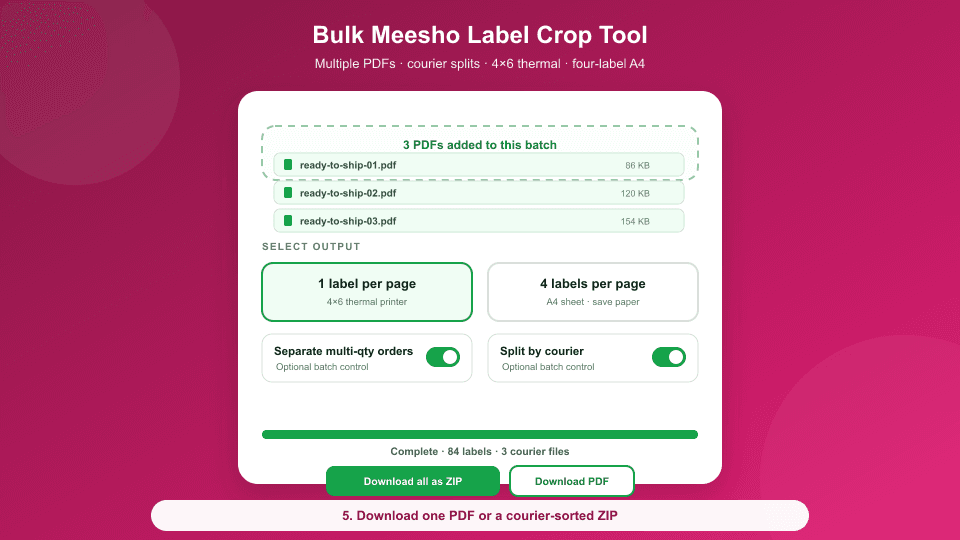
Nine-second overview: add the batch, choose options, crop locally and download.
Use Actual Size or 100%, then scan one test barcode before the full run.
In the Meesho Supplier Panel, select the ready-to-ship orders and download the original label PDF. Avoid screenshots so the barcode and text stay sharp.
Drop your files into the cropper or click the upload area. You can select several Meesho PDFs and process them in the same browser session.
Use one label per page for a common 4×6 thermal workflow, or four labels per page when you print on regular A4 sheets.
Optionally separate multi-quantity orders and split labels by detected courier. Supported labels are sorted by SKU so repeated products stay together.
Generate the output, download the PDF or grouped ZIP, and test one label at Actual Size or 100% before printing the complete batch.
Choose your print path
The cropper prepares both common dispatch layouts. Your print driver still needs the matching paper size and scale.
Use a dedicated shipping-label printer, select the matching media size and print without fit-to-page scaling.
Arrange four cropped labels on one landscape A4 sheet to reduce unused paper in a manual cut-and-pack workflow.
Private by design
Meesho labels contain customer contact and delivery details. This cropper reads the source file, creates the output and starts the download locally in your browser—without a label-upload API.
Read the privacy policyBefore you upload a customer’s address anywhere
Most label croppers look the same on the landing page. These are the five things worth checking in any of them — including this one — before a dispatch run depends on it.
A Meesho label carries the customer’s name, phone number and full address. Many online croppers upload the file to a server to process it. This one reads and crops the PDF inside your browser tab, so the source file is never transmitted.
A day’s dispatch is rarely one PDF. Check that several files can be added together and come back as one print-ready output or a grouped ZIP, rather than repeating the same upload-crop-download cycle per file.
A thermal printer wants one 4×6 label per page; an office printer wants four to a sheet with sensible margins. A cropper that only produces one of those forces you to rescale at print time, which is where barcodes stop scanning.
Labels in download order make the picker walk the shelves at random. Sorting by SKU, and splitting by courier where it applies, is what turns a print job into a packing queue.
Check for sign-up walls, per-file limits and watermarks before you rely on a tool mid-dispatch. Ours is free and needs no account for cropping; the paid plans cover the other extensions, not this.
When it goes wrong
Almost always a scaling problem rather than a cropping one. Print at 100% with "fit to page" turned off, and match the layout to the paper: the 4×6 output for thermal rolls, the A4 sheet for office printers. Test one label before committing the batch.
Use the original file downloaded from the Supplier Panel. A PDF that has been printed to PDF, screenshotted, edited or re-saved by another app loses the structure the cropper reads. If the file is password protected, remove the password first.
Meesho label PDFs are not identical across couriers and label types, and a mixed batch can contain more than one layout. Crop the batch, check the output count against the order count, and run any odd files separately rather than assuming the whole run failed.
Turn on the option to leave out the supported invoice area. Some formats place tax details inside the label block itself, in which case removing it would cut into the address, so it is kept deliberately.
Sort by SKU before generating the output, so identical products print together and the picker makes one pass per SKU. For multi-courier days, split by courier as well and keep the handover piles separate from the start.
Because the work happens locally, a very large batch depends on your machine and browser. Try a smaller group of PDFs, use an up-to-date Chrome or Edge, and keep the tab open while it runs — closing it cancels the job, since nothing is queued on a server.
Questions, answered
Download the original label PDF from the Meesho Supplier Panel, add it to the cropper above, choose one-label thermal or four-label A4 output, select any sorting options, and generate the new PDF. Print one test label at Actual Size or 100% before the complete run.
Yes. Select several Meesho label PDFs in one session. Their supported pages enter the same processing queue and can be sorted, cropped and exported together. For an unusually large batch, use smaller groups to keep browser memory responsive.
Choose “1 Label per Page,” select the matching label size in your printer driver, and print at Actual Size or 100%. Because printer drivers and label stock differ, scan one test barcode before printing the full batch.
Yes for supported Meesho label formats. The cropper detects the TAX INVOICE boundary and keeps the shipping-label area in the cropped output. Use split-only mode when you want to preserve the full original pages instead.
No. PDF reading, cropping, sorting and download creation happen locally in your browser. The files you choose are not sent to EcomFriendly for processing.
Yes. The online cropper is free to use without an account, payment, watermark or per-label charge from EcomFriendly.
No. The label cropper works directly on this page. The optional EcomFriendly Meesho Automation extension is a separate companion product for listing and catalog workflows; it is not required for PDF cropping.
Free for every dispatch batch
Open the cropper now, or add the separate automation extension when you also want help with repetitive listing work.