What is Meesho listing automation?
Meesho listing automation replaces repeated catalog data entry with a reusable browser workflow. Instead of typing the same title structure, attributes, HSN, GST, weight and seller details into every form, you capture a working listing once and replay it on future add or edit catalog pages.
EcomFriendly works on the official Meesho Supplier Panel in desktop Chrome. It fills supported fields but does not remove the important human step: you still inspect images, prices, variations and category-specific attributes before publishing.
See the Meesho automation flow
These annotated product screens show the actual three-part workflow: capture the profile, save reusable defaults and send the completed setup to one or many catalog tabs.
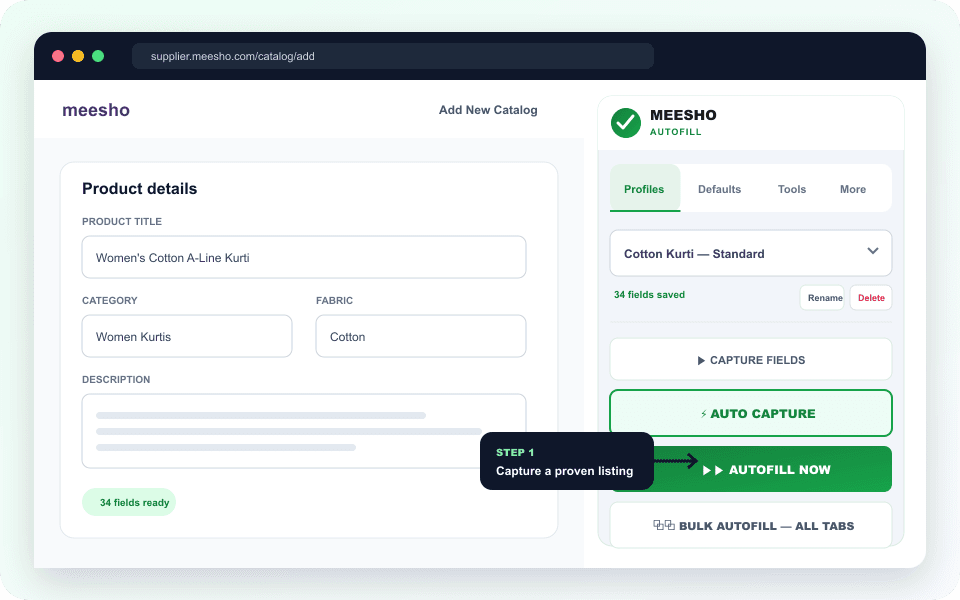
Open a completed add or edit catalog page, create a named profile and use Auto Capture to save supported visible fields.
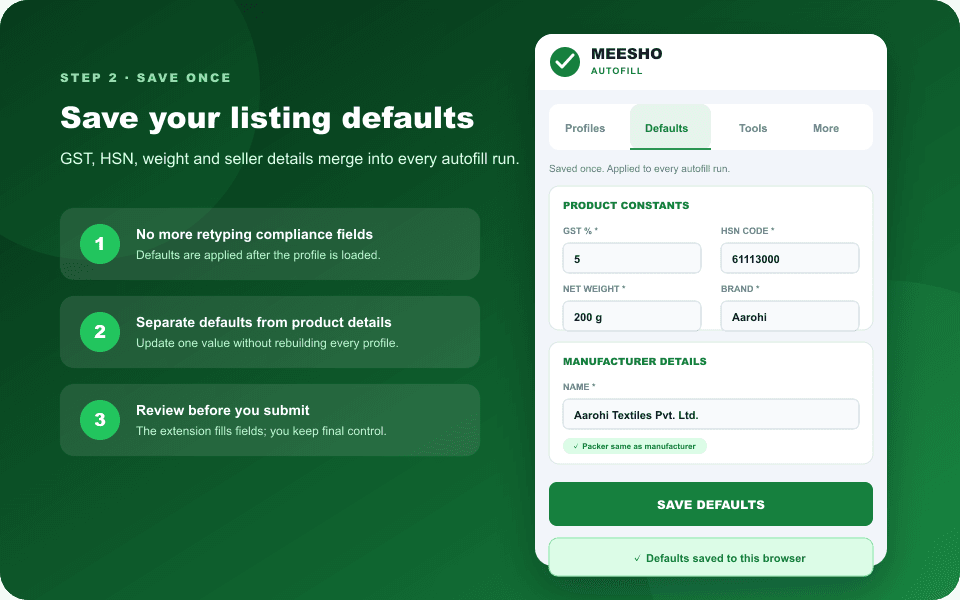
Keep HSN, GST, weight, brand and seller details separate from product-specific fields so one update applies to future runs.
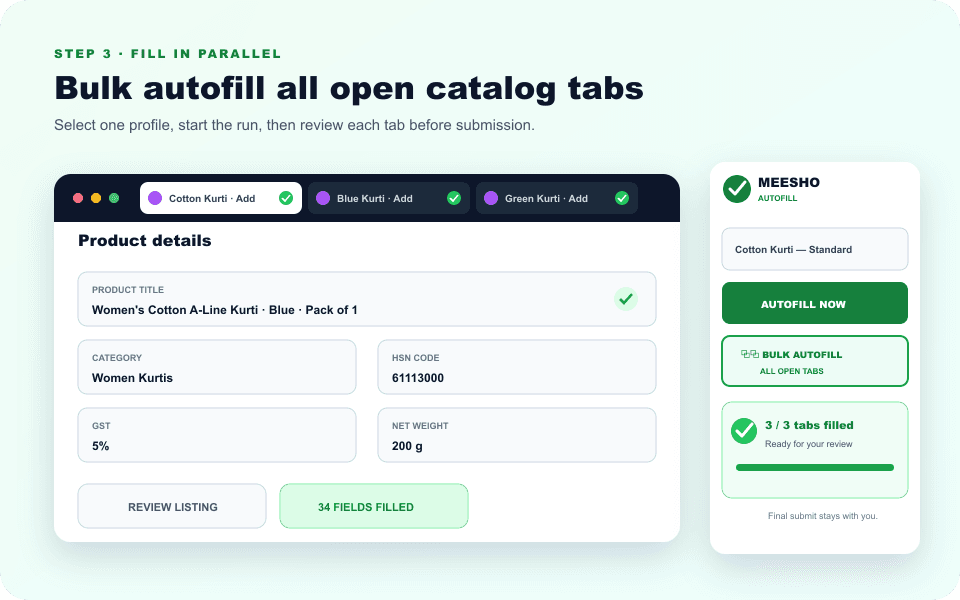
Run the profile on the current form or send it to all open Meesho catalog tabs, then review each result before submission.
EcomFriendly vs EcomDost
A factual comparison of the public feature and pricing information available on 29 July 2026. “Not stated” means the feature is not described on the compared public page; it does not claim the feature is unavailable.
| FEATURE | ECOMFRIENDLY | ECOMDOST |
|---|---|---|
| Reusable listing profiles | Included | Included |
| Auto capture of visible fields | Included | Included |
| Bulk autofill across all open catalog tabs | Included | Not stated on public extension page |
| Reusable GST, HSN, weight and seller defaults | Included | Not stated on public extension page |
| Shipping-fee image workflow | Included in the same extension | Sold as a separate Shipping Fixer product |
| Automatic pending-order acceptance | Included | Not stated on public extension page |
| Try before paying | 10 demo tokens; no card required | No free trial stated on public extension page |
| Published plan price | ₹199/month or ₹999/year; auto-renewing | ₹1,499 lifetime; one-time |
| Final listing submission | Seller reviews and submits | Seller reviews and submits |
EcomDost facts checked against its public Meesho Automation Extension page and homepage. Product names belong to their respective owners; pricing can change.
What the Meesho automation tool includes
Important: automation prepares the form; it does not replace your review.
Marketplace fields and category rules can change. Check product images, prices, sizes, variation mapping, mandatory attributes, HSN/GST data and every filled value before submitting a catalog.
Meesho listing automation FAQ
What is Meesho listing automation?
Meesho listing automation uses a browser extension to fill repetitive catalog fields inside the Meesho Supplier Panel. EcomFriendly captures a completed listing as a reusable profile, combines it with saved defaults and replays those values on one or multiple open catalog forms.
Can EcomFriendly bulk autofill multiple Meesho listings?
Yes. Open the Meesho add or edit catalog pages you want to prepare, choose a saved profile and click Bulk Autofill — All Open Tabs. The extension sends the profile and saved defaults to every reachable Meesho catalog tab, after which you review each listing before submission.
Which Meesho listing fields can I save?
You can capture supported visible catalog fields and separately save recurring defaults such as GST percentage, HSN code, net weight, country of origin, brand, quantity, manufacturer, packer and optional importer details. Category-specific fields should always be reviewed after autofill.
Does the extension publish listings without my approval?
No. EcomFriendly fills supported fields but leaves final review and submission to the seller. Check images, prices, variations, category attributes and compliance information before publishing each catalog.
How is EcomFriendly different from the EcomDost Meesho extension?
Both products publicly describe reusable profiles, one-click autofill, auto capture and seller review before submission. EcomFriendly also documents bulk autofill across every open catalog tab, reusable global defaults, shipping-fee image testing, automatic order acceptance and 10 free demo tokens in one account. EcomDost advertises a ₹1,499 lifetime autofill plan; EcomFriendly offers ₹199 monthly or ₹999 yearly auto-renewing plans.
Does EcomFriendly need my Meesho password?
No. The extension works inside the Meesho Supplier Panel session already open in Chrome. Your reusable profiles and defaults are stored in the browser; EcomFriendly account access is used for activation and token balance.
How does the free demo work?
Every new EcomFriendly account gets 10 demo tokens. One successful image-generation or listing-automation action uses one token, while failed actions are automatically refunded. No card is needed to start.
What happens when my demo tokens run out?
You can subscribe to the ₹199 monthly plan for 500 tokens per billing cycle or the ₹999 yearly plan for unlimited image generation and listing automation. Plans auto-renew through Razorpay until cancelled.
Does Meesho listing automation work on mobile?
EcomFriendly is a Chrome extension designed for the desktop Meesho Supplier Panel. Use desktop Chrome or a compatible Chromium browser for listing automation; keep final submission under your control.
Build the complete Meesho listing workflow
Use these practical guides to prepare your catalog, configure the extension and automate the adjacent jobs.
See every profile, default and multi-tab autofill control in detail.
Prepare your master catalog and fix common template errors.
Understand how image variants are tested against displayed shipping fees.
Set up automatic pending-order acceptance and keep manual control.